
Register the tool in Moodle
This guide is meant for the Moodle administration and for whoever runs NextPad. Both sides need HTTPS. Below, https://nextpad.example.org stands for the NextPad address.
Each kind gets its own tool. Teachers then simply pick NextPad Idea collection, NextPad Quiz or NextPad Pad in the activity chooser and have nothing to type.
Steps in Moodle
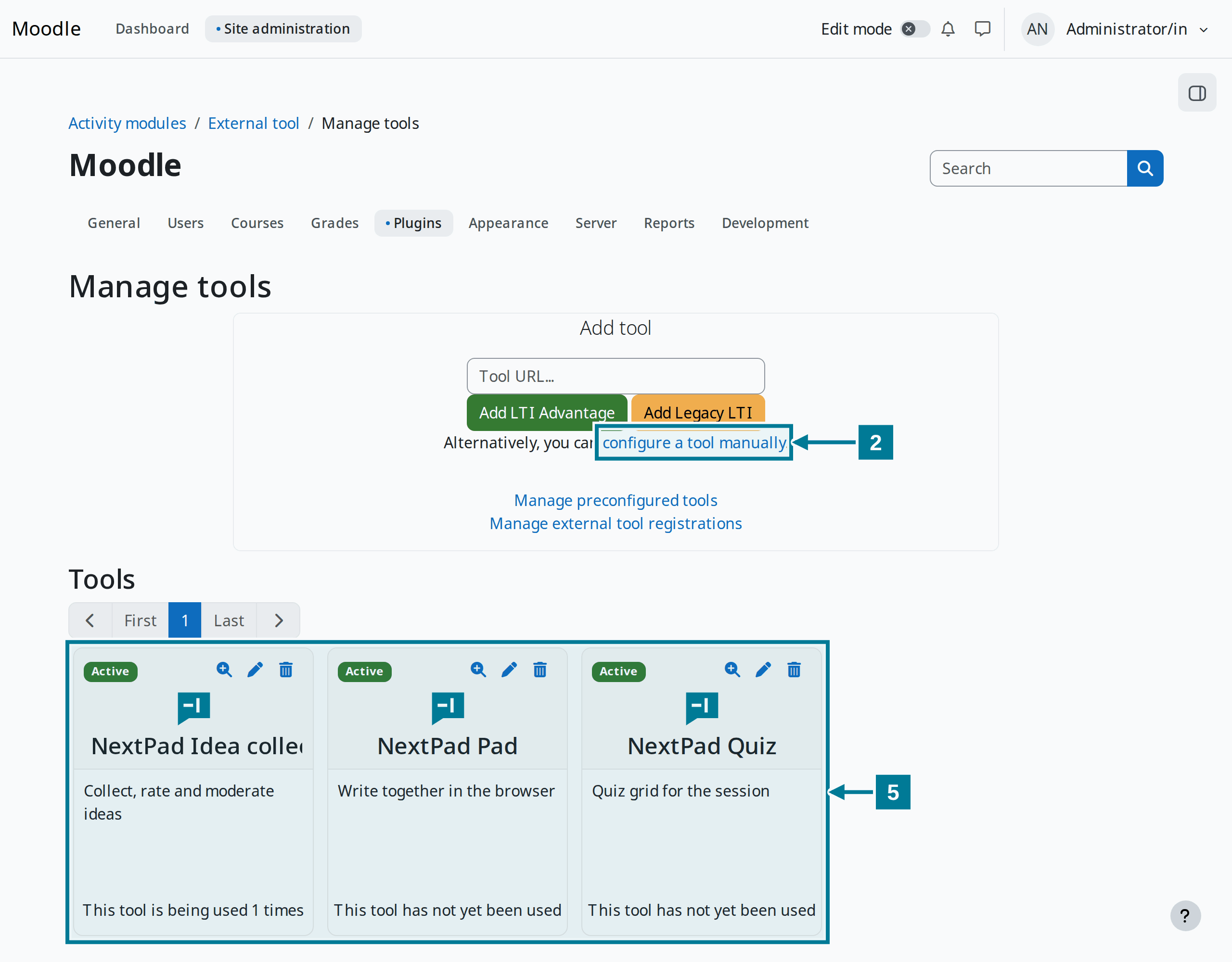
- Open Site administration › Plugins › Activity modules › External tool › Manage tools.
- Choose configure a tool manually.
- Fill in the form as in the table below and choose Save changes.
- Repeat steps 2 and 3 for the other kinds, each with its own name and its own value for
typ. - The tools appear as cards under Tools. The magnifier on a card shows the client ID and the deployment ID. Both belong in the NextPad configuration.
The fields
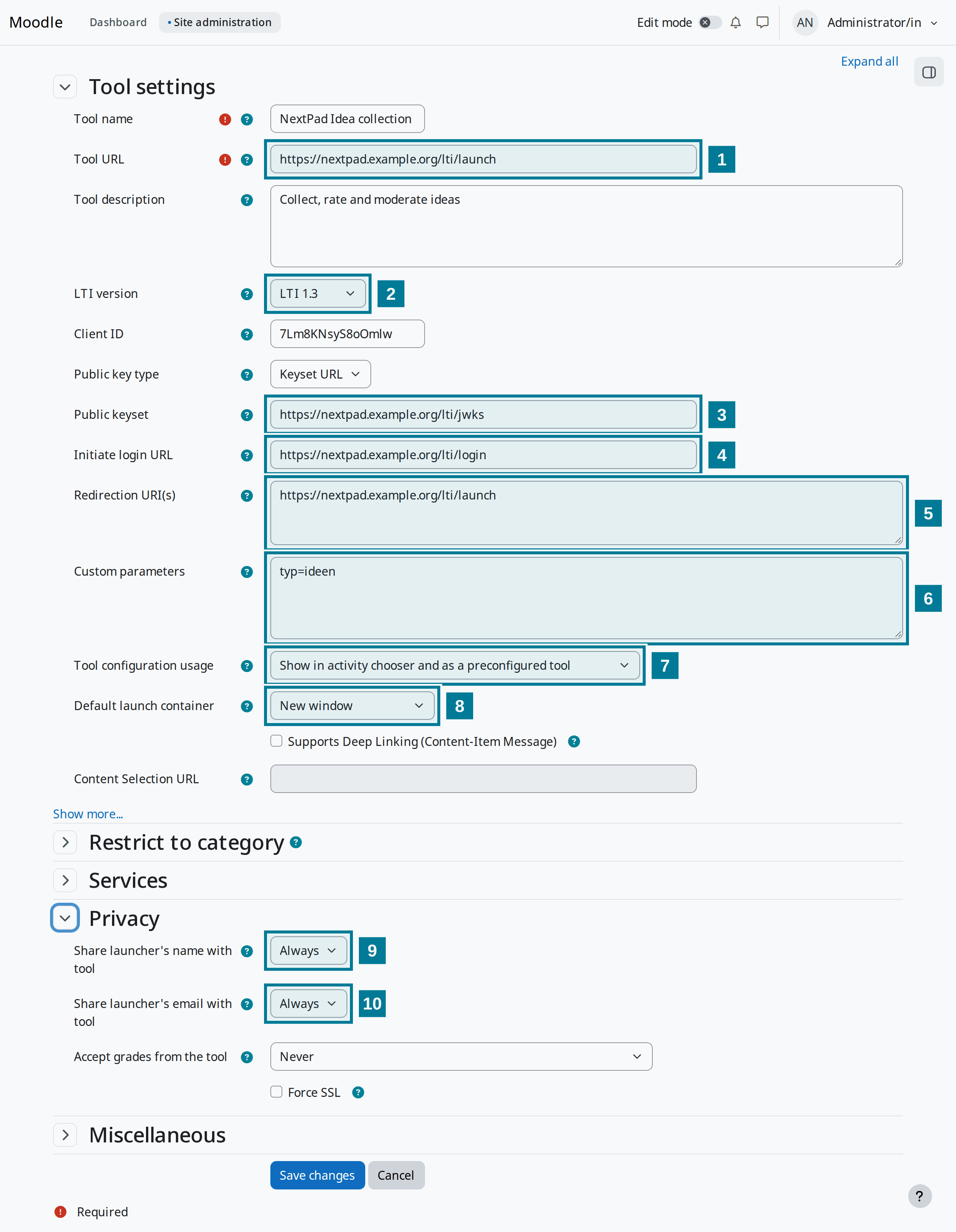
| No. | Field | Value |
|---|---|---|
| Tool name | as teachers should read it in the chooser, for example NextPad Idea collection | |
| 1 | Tool URL | https://nextpad.example.org/lti/launch |
| 2 | LTI version | LTI 1.3 |
| 3 | Public keyset | https://nextpad.example.org/lti/jwks (key type: Keyset URL) |
| 4 | Initiate login URL | https://nextpad.example.org/lti/login |
| 5 | Redirection URI(s) | https://nextpad.example.org/lti/launch |
| 6 | Custom parameters | typ=ideen, for the quiz typ=quiz, for the pad typ=pad |
| 7 | Tool configuration usage | Show in activity chooser and as a preconfigured tool |
| 8 | Default launch container | New window |
| 9 | Share launcher’s name with tool | Always |
| 10 | Share launcher’s email with tool | Always |
The parameter values ideen, quiz and pad stay the same in every language.
Under Show more https://nextpad.example.org/static/logo.svg can be entered as Icon URL. The activity chooser then shows the NextPad mark instead of a puzzle piece.
Step in NextPad
NextPad only accepts launches from Moodle sites listed in the platform file lti-platforms.json. Each tool gets an entry there with its client ID and its deployment ID. The server documentation describes the structure and fields of the file. NextPad must restart after the file changes.
Good to know
- Moodle passes name and language on to NextPad. NextPad needs the email address for the notice before deleting one’s own free pads and to recognise admins from
NEXTPAD_ADMINS. - In NextPad everyone with the Moodle capability
mod/lti:managemay moderate. By default these are editing and non-editing teachers and the manager role. - The activity also runs embedded in the Moodle page. In a new window it has the full width though, and the board is easier to drag onto the projector.
- When Moodle changes its keys, NextPad fetches the new ones by itself if the platform file holds a key address. With a key file, the file must be renewed.